Unit Testing Entity Framework 7 with the In Memory Data Store


Entity Framework 7 includes a new InMemory store which is fantastic for unit testing. No more mocking DbContext or doing other dumb things!
Here's how
Start by creating a new class library project using the Class Library (package) template:
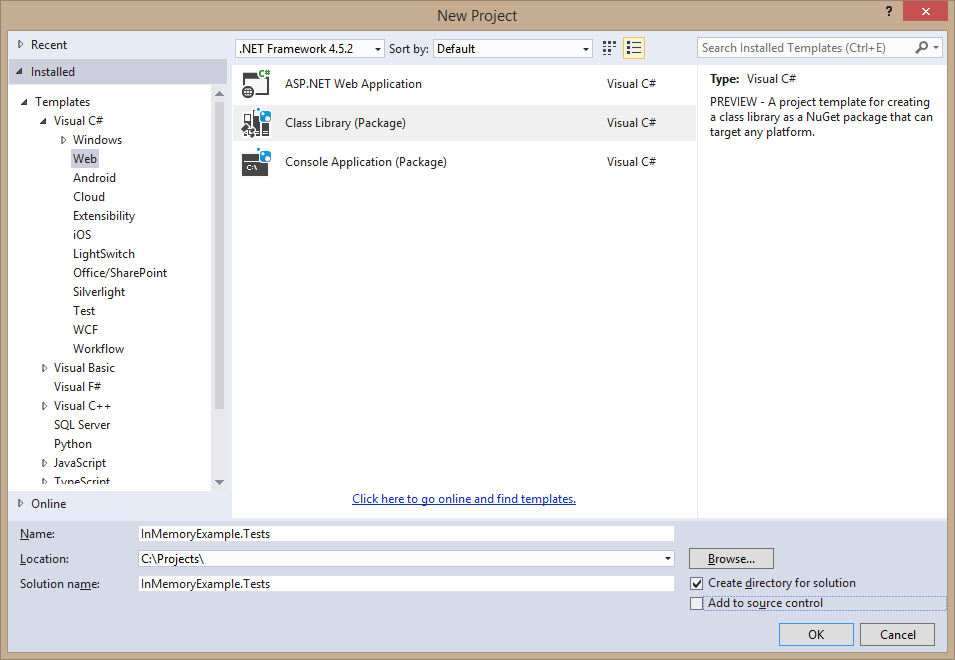
Next, add the appropriate Entity Framework dependencies to your project.json:
"dependencies": {
    "EntityFramework.Core": "7.0.0-beta7",
    "EntityFramework.Commands": "7.0.0-beta7",
    "EntityFramework.InMemory": "7.0.0-beta7"
},
and dependencies to the latest xUnit runner:
"xunit": "2.1.0-rc2-build3176",
"xunit.runner.dnx": "2.1.0-beta5-build169"
and finally, add a command to your project.json for the xUnit runner:
"commands": {
    "test": "xunit.runner.dnx"
}
Because we're awesome (seriously, don't do this in a real app, I'm just doing it here because it's easy) we're going to create a DbContext inside of this test project with a Foo entity:
public class MyContext : DbContext
{
    public MyContext()
    {
    }

    public MyContext(DbContextOptions options) : base(options)
    {
    }

    public DbSet<Foo> Foos { get; set; }
}

public class Foo
{
    public int Id { get; set; }
    public string Name { get; set; }
}
Now create a test class:
public class MyTestClass
{
    private readonly MyContext _context;

    [Fact]
    public void FoosIsEmpty()
    {
        var foos = _context.Foos;

        Assert.Empty(foos);
    }
}
In order to set up entity framework for each test, we're going to make use of the fact that xUnit creates a new instance of a test class for each test run. This means we can use the constructor to get a clean MyContext for every single test.
public class MyTestClass
{
    public MyTestClass()
    {
        var db = new DbContextOptionsBuilder();
         db.UseInMemoryDatabase();
        _context = new MyContext(db.Options);
    }

    //Tests
}
The UseInMemoryDatabase call is the fun part. EF will enforce all constraints and validations, however it won't persist anything to a real database and instead hold everything in memory. Which means it's fast and disposable.
Para ordenar las alternativas, conviene tener en cuenta la opción entre camiseta local, visitante o alternativa. Los datos resultan más útiles al leer la composición del tejido indicada en la ficha. Entre los recursos de apoyo, «» facilita la tarea de localizar datos relacionados con el tema. Una vez elegido el modelo, conviene confirmar las medidas utilizadas para elegir la talla.
Para ordenar las alternativas, conviene tener en cuenta la opción entre camiseta local, visitante o alternativa. Los datos resultan más útiles al leer la composición del tejido indicada en la ficha. Entre los recursos de apoyo, «tercera equipación del Real Betis» facilita la tarea de localizar datos relacionados con el tema. Una vez elegido el modelo, conviene confirmar las medidas utilizadas para elegir la talla.
As an event approaches, it is worth considering how details related to game cosplay costumes will affect the complete look. During a long convention day, it helps to assess details related to Genshin Impact cosplay costumes together with fit and fabric. For choices related to details related to photoshoot preparation, anime cosplay costumes for event preparation offers a useful starting point for practical preparation. To preserve the character's visual identity, it is useful to check details related to heat resistant cosplay wigs against the wearer's own needs.
You can also, if you're so inclined, set up a seed class to populate the in memory store with test data to use for each test. 👍
Update: The in memory store no longer supports constraints. (Embarrassingly, it didn't at time of this writing either, I was mistaken.) This is because constraints are solely a relational thing, and other types of stores don't enforce them. This is discussed in this Github issue, specifically this comment.